EFF Management & Distribution: Connecting Flight Planning to the EFB


Updated 7th April 2026
Many Electronic Flight Bag (EFB) applications provide limited use when it comes to weight and balance (or mass and balance).
In many cases, these calculations are not directly integrated with any flight summary data.
As a result, pilots are often forced to switch between multiple apps or perform manual W&B calculations that aren’t properly recorded or tracked.
The Weight & Balance EFB tool within skybook enhances crew efficiency by allowing instant access to W&B calculations directly within the flight-phase workflow.
This means fewer apps to juggle and less paperwork, streamlining the W&B process for pilots!
The EFB app automatically downloads the correct weight and balance configurations for the aircraft being flown, based on the sector.
During the pre-flight checklist, pilots can efficiently review load and fuel weights to determine the safe operating limits within the center of gravity (CG) graph.
 The Basic Operating Weight (BOW) is automatically taken from the aircraft configuration data. The EFB then auto calculates the weights for Zero Fuel Weight (ZFW), Take-off Weight (TOW), Landing Weight (LDW) based on the load and fuel information.
The weights are plotted onto the aircraft's CG envelope to ensure the aircraft is accurately loaded before taking off.
If any calculations fall outside the CG envelope, a warning will be triggered and the loadsheet cannot be signed off.
For enhanced safety, crew members can only view and sign off the digital loadsheet when the CG is within the correct envelope safety limits.
Once signed and sent, the loadsheet will sync with the ground team and be fully accessible in the flight summary data. Dispatchers can see this digital handshake as part of the pre-flight status update.
Crew can also share the W&B data by syncing with other EFB devices.

To utilize the EFB Weight and Balance calculator, the information from the aircraft’s manufacturer manuals must be entered within the ground portal.
The W&B configuration involves creating various profiles like Pax & Cargo, PAX only, and Cargo only. Each profile is created with data for Basic Weights, Weight Limits, and Constants.
Lastly, the station data for the aircraft is configured, including weight information and limits for seat rows, cargo, and fuel.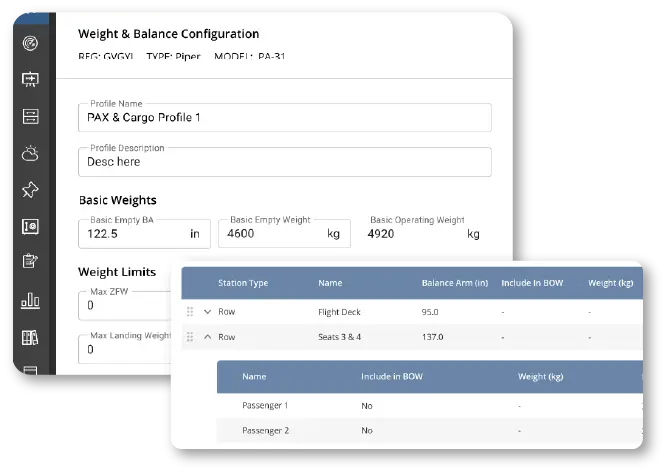
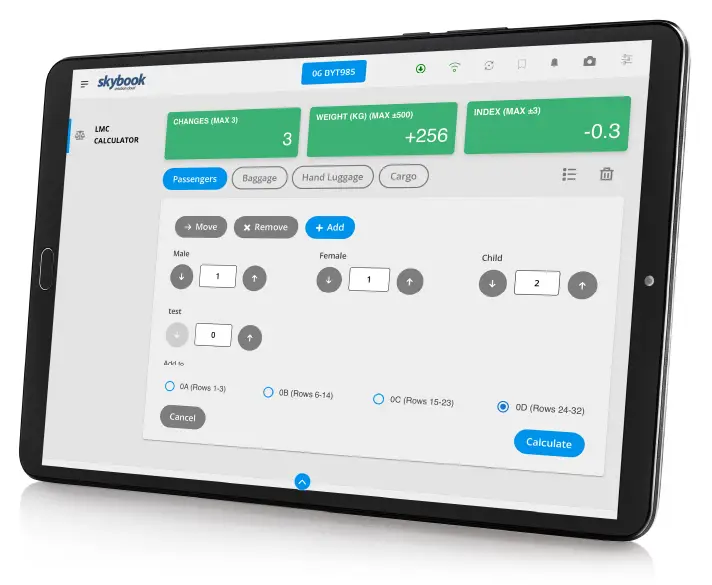
There is also a digital Last Minute Change calculator which allows crew to easily see alterations to the aircrafts load within the CG envelope limit.
This provides revenue opportunities, allowing airlineas to confidently accommodate extra passengers, baggage, or cargo while maintaining safe weight and balance limits.
If a CG limit is exceeded, the LMC calculator will display a warning alert showing the maximum allowable weight, permissible changes, or index value for that aircraft.
The LMC calculator streamlines the process for airlines that struggle with accurately managing last-minute changes.
Any last minute changes are also added to the W&B calculations, EFB load sheet and sent to the ground, before signing the flight off for departure.
The skybook weight and balance calculator is an intuitive new EFB tool designed to support both small and large airline operators worldwide.
Delivering accurate calculations, streamlined workflows, improved safety compliance and opportunities to drive additional revenue.
Get in touch to see how the W&B calculator performs.
Alternatively, why not learn more about skybook.